You can insert special characters by clicking "Insert" on the menu, then click the "Ω Special Characters", the choose "Latin" category from the drop-down menu, and then Phonetics (IPA) sub-category.
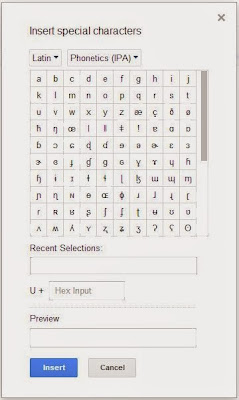 |
| Insert Special Characters in Google Docs |
There is a short-cut for inputting some IPA symbols which you use them frequently. Automatic Substitution in Google Docs similar to Auto Correct in MS Word. You can replace common acronyms, misspellings and other symbols. So you can set auto-replace for your IPA symbols, for example, "e<" for "ɛ", "o/" for "ø", "o>" for "ɔ" etc.
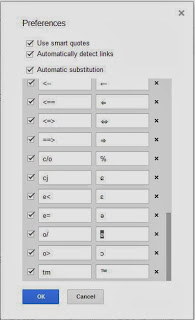 |
| Automatic Substitutions in Google Docs |


Comments
Get professional trading signals delivered to your mobile phone daily.
Follow our signals NOW & earn up to 270% per day.